Your wedding invitation, ready in one minute
With both your names, the date and the venue, your invitation gets its own link. Send it free from your WhatsApp and see who's coming.
Invited to a wedding? Find your invitationFrom idea to sent invitations in 5 simple steps
No designers, no printers. You choose how to send: free from your WhatsApp, or let Nozzia do it for you.
Create your wedding in a minute
Type both your names, the date and the venue: your invitation goes live with an easy link to share, like nozzia.com/b/ana-y-luis. Add the time, photos, dress code and gifts whenever you like.
- Free, no credit card
- Send it to yourself first on WhatsApp
- Edit whenever you want
Choose your invitation design
Pick one of the 11 designs, all included, and see it with your own wedding details before sending anything. Each guest gets their own version, with their name on it.
- Nozzia's own designs
- Preview with your real details
- Every guest's name on their invitation
Paste your guest list
Copy it from WhatsApp, your notes or Excel: one invitation per line, with companions, and email is optional. Missing numbers? Share your wedding link in the family group and approve whoever signs up.
- Paste a list or upload an Excel/CSV file
- Up to 10 companions per invitation
- Groups and duplicate warnings
Send by WhatsApp or email
Free from your WhatsApp: Nozzia prepares each guest's message with their personal link and you send it from your number, one after another. Or let Nozzia send them for you in one click, through its WhatsApp or by email.
- From your phone: free and unlimited
- From Nozzia: 5 automatic sends to try
- Reminders from your phone to non-responders
Get RSVPs in real time
Your dashboard shows who confirmed, who hasn't, how many plus-ones are coming and who opened the invitation without replying. No spreadsheets, no missed calls.
- An email with the new replies
- Live dashboard
- Export to Excel whenever you need
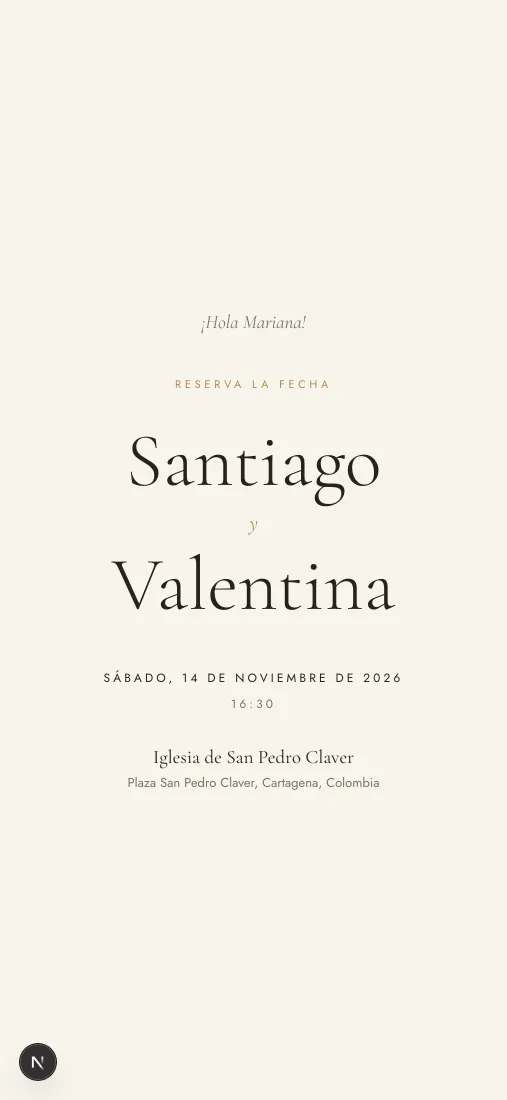
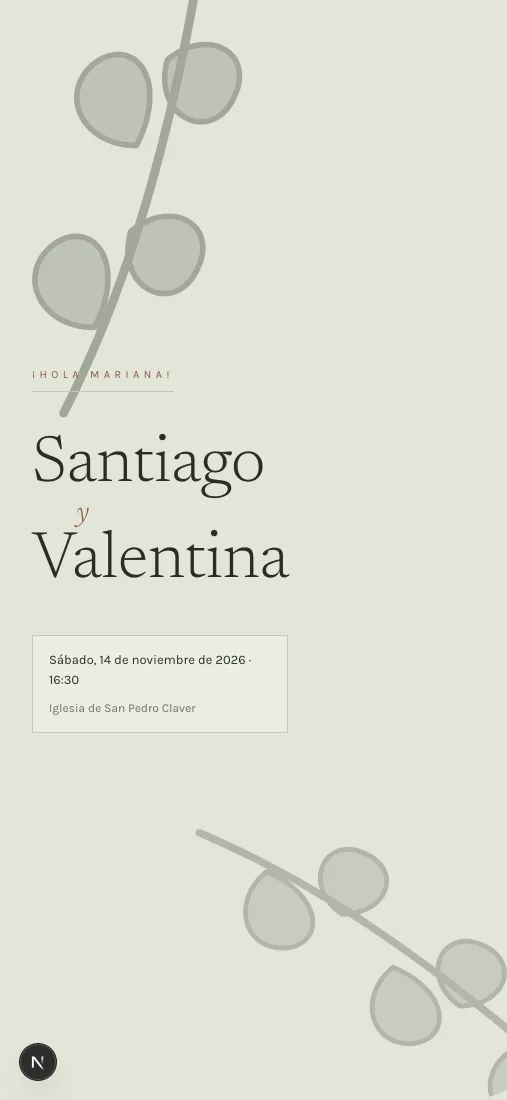
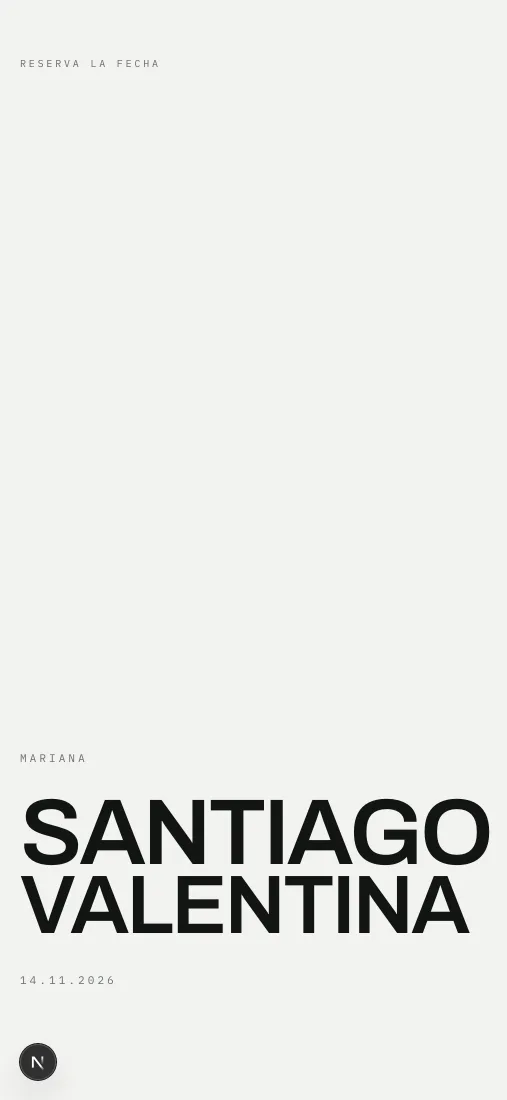
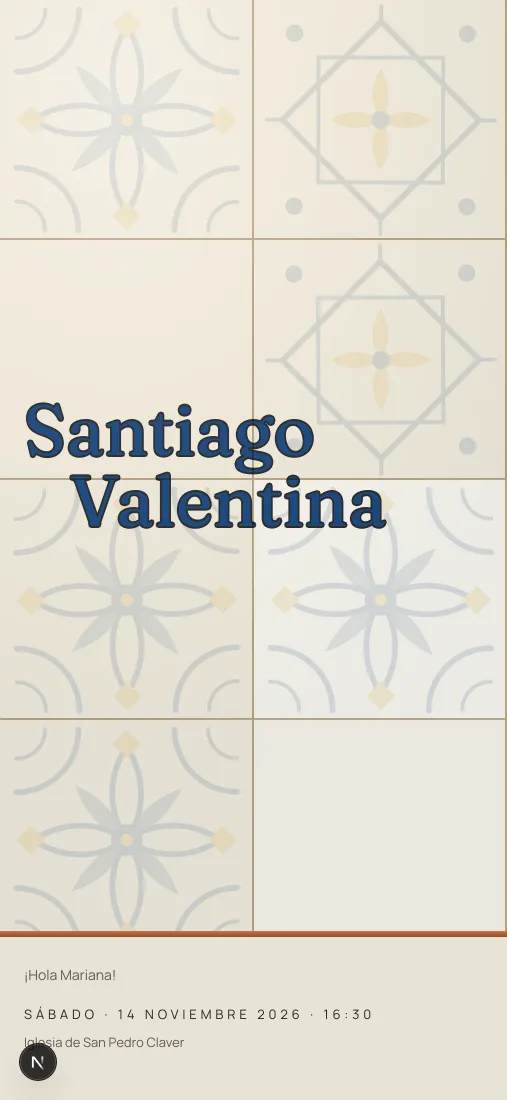
How your invitation could look
11 designs, each with its own typeface, palette and way of opening. Every example uses the same wedding, so the design is the only thing that changes.
Get one on your WhatsApp
Leave your number and a real wedding invitation lands on your phone, just like the one Nozzia sends your guests: the message, the envelope opening, and the screen where they confirm. It takes under a minute.
 Nozzianow
Santiago and Valentina are inviting you to their wedding.
Made for inviting on WhatsApp
Your guest list, sending, RSVPs, cash gifts and the wedding day, all in one place.
Send it from your WhatsApp, free
It comes from your number, one your guests already know: Nozzia has each message ready, with their personal link, and opens their chat. No limit.
Or let Nozzia send it
By WhatsApp or email, and you see whether it arrived, whether they read it and whether they opened the invitation. You get 5 trial sends; the Invitations Plan covers up to 500.
Your list, no retyping
Paste it the way you have it in WhatsApp or your notes: Nozzia picks out each name, number and email, and reads “Camila & Andrés” as one invitation with a companion.
Detailed RSVPs
Each guest tells you who's coming with them, by name, and about any allergies. If you turn it on, they also pick a dish and ask for transport. They can change their answer until your reply-by date, if you set one.
Cash gifts, straight to you
Guests copy your bank or wallet details from the invitation and send the gift themselves. When they tap “I already sent my gift”, it shows up in your envelope book. Nozzia never touches the money.
And on the wedding day
Everyone who confirms gets a pass for the day: the schedule, directions and their table once you assign it. If you turn them on, guests request songs from the DJ, sign the guestbook and leave you voice messages.
Your wedding, in yourpocket
With the Nozzia app your wedding is on your phone, with the same account as the web: edit the details and the design, build your guest list, send the invitations, see who has confirmed and browse the photos your guests upload.
Your list and the replies
Add guests, see who has confirmed and who hasn't replied yet, and send the invitations from the app.
Your gallery and its QR code
Browse the photos your guests upload and show your gallery's QR code so they can add theirs from the browser, no app needed.
Live sync
Any change you make in the app shows up instantly on the web — and vice versa.
Built for couples
A clean, elegant interface so you actually enjoy planning your day.
Free to download. In-app purchases are charged in your local currency.
Nozzia
Your perfect day, in an app
Collaborative photo gallery
Your guests upload their photos from their phones by scanning a QR code, with nothing to install, and they all end up in your wedding album.
Live screen
Show only the photos you approve on a screen at the party.
You decide who gets in
Open, code-protected or guests only
Full download
Download all photos in high quality
Wedding gallery
Moments from your guests
Plan your wedding tables without paper floor plans
Draw your venue, place every guest at their seat and share the plan with the venue and the caterer. Your guest list is already in there.
- Place each guest by dragging, or fill the tables in one click
- Companions next to whoever brings them, and you mark the kids on the plan
- Export the plan as an image or a spreadsheet for venue and catering
Find your vendors and ask for a quote on WhatsApp
Venues, photographers, caterers, DJs and more in your city. Message them directly on WhatsApp, no middlemen, and save them to your wedding.
- Straight to their WhatsApp, no fees or middlemen
- Once your wedding is set up, the message already includes your date, city and guest count
- Save them to your wedding and, if you like, show them on your invitation
Luz y Lente
Photo & video · Medellín
Verified WhatsApp
Hi, Luz y Lente. I saw your profile on Nozzia. We're Laura and Andrés. We're getting married on February 14, 2027 in Medellín. We'll have about 120 guests. Could you send us a quote?
10:24
Do you run a wedding business?
Create your free profile and share your link. Couples who set up their wedding from it feature you on their invitation.
Everything you need for your wedding
Inviting is free: create your invitation and send it from your WhatsApp. You only pay if you want Nozzia to send it for you or need a bigger gallery, with a one-time payment per wedding and no subscription.
Everything you need to invite people yourself.
- Your wedding live in a minute, with its own link
- All 11 invitation designs
- RSVP, map, itinerary, seating, digital envelope and a wedding-day pass
- Unlimited sends from your WhatsApp, with each guest's link
- Reminders from your phone and WhatsApp updates for guests who confirm and opt in
- Free trial: 5 automatic sends and 50 gallery photos
Nozzia sends every invitation for you and tells you who confirmed.
- Automatic WhatsApp or email delivery
- Unlimited guests (up to 500 sends)
- Live tracking: delivered, read, opened the invitation, confirmed
- Pick who gets it and Nozzia sends it: no going guest by guest
- If a send doesn't arrive, it doesn't count toward your 500
Your guests upload the photos and videos from the party.
- Upload by QR or link, nothing to install
- Up to 2,000 photos and 100 videos of 60 s
- Available for 12 months after the wedding
- Download in high quality
Invitations sent by WhatsApp + photo and video gallery
One payment for the whole wedding. Unlimited guests.
Printing 100 invitations starts around $80 USD before delivery. A QR photo gallery alone, $45 to $50 USD. Nozzia: $21.98 USD for both, one payment.
Prices in USD. In Colombia: $39.900 COP and $29.900 COP. No card required to start.
No credit card. One payment per wedding.
Frequently Asked Questions
Answers to the most common questions about Nozzia
Nozzia is a digital wedding invitation platform, with a photo gallery for your guests. You pick one of the 11 designs, load your guest list and send each invitation from your own WhatsApp for free, or let Nozzia send it for you. Every guest RSVPs from their personal link, you see the replies within seconds and, on the day, your guests upload their photos to one shared album.
You create a free account and, with your names, the date and the venue, your invitation has its own link within a minute, like nozzia.com/b/ana-y-luis. You pick one of the 11 designs, paste your list from WhatsApp or your notes (or upload a spreadsheet) and send each invitation from your own WhatsApp, or let Nozzia send it. Your guests open their link in the browser, with nothing to install, and RSVP for themselves and their companions. You can add the time, photos, dress code and gifts whenever you like.
Nozzia comes with 11 designs of its own: warm-paper classic, botanical, editorial, Mediterranean, art deco, letterpress, terracotta, starry sky, tropical, watercolour and Bauhaus. Each one has its own typeface, palette and opening animation, and all of them come included with your wedding: you can switch between them whenever you like. You can see them all running, on a sample wedding, at nozzia.com/en/invitaciones.
Yes. On the design you pick you add your names, the date and time, the ceremony and reception, up to 12 photos, your story, parents and godparents, the dress code, the schedule, whether children are invited, your gift list or digital envelope and, if you like, a password. Every guest gets their own version with their name and, if you want, a personal message. Typeface, colours and animation come with each design: for a different style, switch designs whenever you like and your details stay.
It's free to create your wedding, with all 11 designs included, build your guest list, collect RSVPs, plan the seating and the schedule, and send every invitation from your own WhatsApp, with no limit. You only pay if you want to: the Invitations Plan (USD 12.99 per wedding; COP 39,900 in Colombia), for Nozzia to send for you, with unlimited guests and up to 500 automatic sends, and the Wedding Gallery (USD 8.99; COP 29,900), with 2,000 photos and 100 videos. When you create your wedding you get 5 automatic sends and 50 photos to try it out. One payment per wedding, no subscription and no card to start.
Yes, two ways. Free from your phone: Nozzia prepares each guest's message with their personal link and you send it from your own WhatsApp, one after another, with no limit. Or let Nozzia send it from its own number, with the guest's name, your invitation image and their link, and you see whether it was delivered, whether they read it and whether they opened the invitation. Nozzia's sends go by WhatsApp or by email (you pick one per send) and come out of your 5 trial sends or the Invitations Plan.
Each guest opens their personal link, says whether they're coming and ticks which of their companions are coming, with their names, and tells you about their dietary preference, allergies or any special request. If you turn it on, they also pick each person's dish (up to 4 options), ask for transport, suggest a song or ask to bring someone else, which you approve. They can change their answer any time, until the reply-by date if you set one. You see it in your dashboard within seconds and download an Excel sheet ready for the caterer.
No. They receive a link over WhatsApp or email and open the invitation in their phone's browser. No account, no app, and no sign-up to confirm attendance.
It's your wedding's shared album: your guests scan your gallery's QR code, which you can put on the tables or on the live screen, and upload their photos from their phones, with nothing to install. You see them during the party, and the live screen only shows the ones you approve. The next day their invitation takes them to the gallery, Nozzia sends the link to confirmed guests who accepted updates or left an email, and you download everything in high quality. Your wedding comes with 50 free photos; the Wedding Gallery adds 2,000 photos and 100 videos.
Yes, on their phones, with nothing to install: if you turn it on in RSVP questions, every invitation's wedding pass comes with a 10-shot camera on the wedding day and the day after. The photos develop at 9 AM the day after the wedding, and before that nobody sees them on Nozzia, not even the two of you. It works with the Wedding Gallery: every shot counts toward its quota.
Yes, we apply technical and organizational security measures to protect your information and that of your guests.
Yes, if they want them. When they confirm, guests with a mobile number on your list can tick a box, and Nozzia sends them on WhatsApp a confirmation of their reply, the wedding details two days before and the gallery link the day after. Those messages don't use your sends, and guests can opt out by replying STOP. You nudge guests who haven't replied yet yourself, from your own WhatsApp, up to twice.
No: Nozzia never receives or moves money. For cash gifts, you add your country's payment methods to your wedding (in Colombia: Bre-B, Nequi, Daviplata or a bank account), and your guests copy the details and transfer straight to you. Then they tap “I already sent my gift” and it shows up in your envelope book, next to the physical envelopes you log; from there you thank them on WhatsApp and export everything to Excel.
Everyone who confirms gets a pass for the day: their table (once you assign them), the schedule and directions with Google Maps or Waze. If you turn them on, at the party they can use the disposable camera, request songs from the DJ and watch the photos you approve on the live screen, which you open with a PIN. And if you turn on the guestbook or the voice mailbox, from the invitation they can sign it or leave you a voice message that only the two of you will hear.
Yes. On the web, from your guest list, tap “Co-hosts” and create a link that works once and expires in 7 days. Whoever opens it signs in with their own account and manages guests, sends, design, seating, schedule, gallery and envelopes with you. They can't pay, delete the wedding or add other co-hosts.
On WhatsApp, at +57 302 684 1676: it's the green button you see on the website. For privacy or data requests, write to support@survivorslabs.com.
Guides for planning your wedding
What we learn helping couples plan their wedding, written to save you work.
Wedding flowers and decor: where the money shows
A practical guide to planning wedding flowers and decor: what actually shows in photos, seasonality, reusing arrangements, quotes and setup logistics.
Read the articleHow to Plan and Write Your Wedding Ceremony
A practical guide to building your ceremony: choosing the type, writing the script, assigning roles, preparing vows and readings, and rehearsing it properly.
Read the articleWedding Music and Sound: A Moment-by-Moment Plan
Plan wedding music properly: ceremony mics, cocktail hour volume, speeches, DJ vs live band, noise limits, curfews and what to send your supplier.
Read the article
Got a date and a venue? You're ready to invite
Create your invitation in a minute and send it from your own WhatsApp today, free.
Create my free invitation